RuoYi 框架从零到一 04 - RBAC 权限模型实现
2026-10-12 09:40:00

适合人群:已理解 RuoYi 认证授权机制,想深入学习 RBAC 权限模型的同学
本文是《RuoYi 框架从零到一》系列第 04 篇,基于 RuoYi-Vue 4.x 版本。

建议先读 03 - 认证与授权机制。

一、RBAC 权限模型四层关系

RBAC(Role-Based Access Control,基于角色的访问控制)是企业级系统最常用的权限模型。RuoYi 的 RBAC 模型包含四层关系:
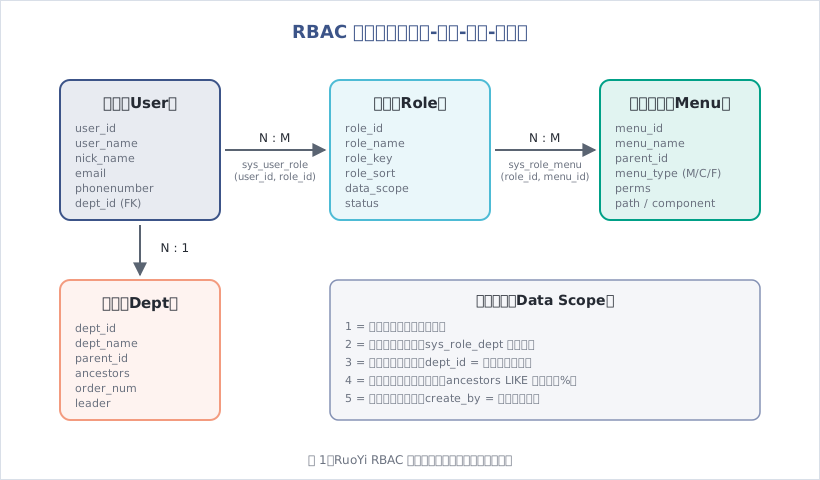
图1:RuoYi RBAC 权限模型四层关系与数据权限范围

1.1 核心实体与关系

(1)用户(User)

sys_user 表:

1
2
3
4
5
6
7
8
9
10
11
12
13
14
15
16
17
18
19
20
21
22
CREATE TABLE sys_user (
user_id BIGINT NOT NULL AUTO_INCREMENT COMMENT '用户ID',
dept_id BIGINT DEFAULT NULL COMMENT '部门ID',
user_name VARCHAR(30) NOT NULL COMMENT '用户账号',
nick_name VARCHAR(30) NOT NULL COMMENT '用户昵称',
user_type VARCHAR(2) DEFAULT '00' COMMENT '用户类型(00系统用户)',
email VARCHAR(50) DEFAULT '' COMMENT '用户邮箱',
phonenumber VARCHAR(11) DEFAULT '' COMMENT '手机号码',
sex CHAR(1) DEFAULT '0' COMMENT '用户性别(0男 1女 2未知)',
avatar VARCHAR(100) DEFAULT '' COMMENT '头像地址',
password VARCHAR(100) DEFAULT '' COMMENT '密码',
status CHAR(1) DEFAULT '0' COMMENT '帐号状态(0正常 1停用)',
del_flag CHAR(1) DEFAULT '0' COMMENT '删除标志(0代表存在 2代表删除)',
login_ip VARCHAR(128) DEFAULT '' COMMENT '最后登录IP',
login_date DATETIME COMMENT '最后登录时间',
create_by VARCHAR(64) DEFAULT '' COMMENT '创建者',
create_time DATETIME COMMENT '创建时间',
update_by VARCHAR(64) DEFAULT '' COMMENT '更新者',
update_time DATETIME COMMENT '更新时间',
remark VARCHAR(500) DEFAULT NULL COMMENT '备注',
PRIMARY KEY (user_id)
) COMMENT = '用户信息表';

关键字段:

  • dept_id:外键,关联部门表(一个用户属于一个部门)
  • password:BCrypt 加密存储(60 位定长字符串)
  • status:账号状态(停用用户无法登录)
  • del_flag:逻辑删除标志(软删除,数据不真正删除)

(2)角色(Role)

sys_role 表:

1
2
3
4
5
6
7
8
9
10
11
12
13
14
15
16
17
CREATE TABLE sys_role (
role_id BIGINT NOT NULL AUTO_INCREMENT COMMENT '角色ID',
role_name VARCHAR(30) NOT NULL COMMENT '角色名称',
role_key VARCHAR(100) NOT NULL COMMENT '角色权限字符串',
role_sort INT NOT NULL COMMENT '显示顺序',
data_scope CHAR(1) DEFAULT '1' COMMENT '数据范围(1全部 2自定义 3本部门 4本部门及以下 5仅本人)',
menu_check_strictly TINYINT(1) DEFAULT 1 COMMENT '菜单树选择项是否关联显示',
dept_check_strictly TINYINT(1) DEFAULT 1 COMMENT '部门树选择项是否关联显示',
status CHAR(1) NOT NULL COMMENT '角色状态(0正常 1停用)',
del_flag CHAR(1) DEFAULT '0' COMMENT '删除标志(0代表存在 2代表删除)',
create_by VARCHAR(64) DEFAULT '' COMMENT '创建者',
create_time DATETIME COMMENT '创建时间',
update_by VARCHAR(64) DEFAULT '' COMMENT '更新者',
update_time DATETIME COMMENT '更新时间',
remark VARCHAR(500) DEFAULT NULL COMMENT '备注',
PRIMARY KEY (role_id)
) COMMENT = '角色信息表';

关键字段:

  • role_key:角色标识符(如 admin、common),用于 @PreAuthorize("@ss.hasRole('admin')")
  • data_scope:数据权限范围(下一节详细讲解)
  • menu_check_strictly:分配菜单时是否父子联动(false 时可以只选子节点,父节点不自动选中)

(3)菜单权限(Menu)

sys_menu 表:

1
2
3
4
5
6
7
8
9
10
11
12
13
14
15
16
17
18
19
20
21
22
CREATE TABLE sys_menu (
menu_id BIGINT NOT NULL AUTO_INCREMENT COMMENT '菜单ID',
menu_name VARCHAR(50) NOT NULL COMMENT '菜单名称',
parent_id BIGINT DEFAULT 0 COMMENT '父菜单ID',
order_num INT DEFAULT 0 COMMENT '显示顺序',
path VARCHAR(200) DEFAULT '' COMMENT '路由地址',
component VARCHAR(255) DEFAULT NULL COMMENT '组件路径',
query VARCHAR(255) DEFAULT NULL COMMENT '路由参数',
is_frame INT DEFAULT 1 COMMENT '是否为外链(0是 1否)',
is_cache INT DEFAULT 0 COMMENT '是否缓存(0缓存 1不缓存)',
menu_type CHAR(1) DEFAULT '' COMMENT '菜单类型(M目录 C菜单 F按钮)',
visible CHAR(1) DEFAULT '0' COMMENT '菜单状态(0显示 1隐藏)',
status CHAR(1) DEFAULT '0' COMMENT '菜单状态(0正常 1停用)',
perms VARCHAR(100) DEFAULT NULL COMMENT '权限标识',
icon VARCHAR(100) DEFAULT '#' COMMENT '菜单图标',
create_by VARCHAR(64) DEFAULT '' COMMENT '创建者',
create_time DATETIME COMMENT '创建时间',
update_by VARCHAR(64) DEFAULT '' COMMENT '更新者',
update_time DATETIME COMMENT '更新时间',
remark VARCHAR(500) DEFAULT '' COMMENT '备注',
PRIMARY KEY (menu_id)
) COMMENT = '菜单权限表';

关键字段:

  • parent_id:父菜单 ID(0 表示根节点,构建树形结构的关键)
  • menu_type:
    • M(目录):一级菜单容器(如”系统管理”)
    • C(菜单):具体页面(如”用户管理”)
    • F(按钮):页面内的按钮权限(如”新增”、”删除”)
  • perms:权限标识(如 system:user:add),对应 @PreAuthorize 注解
  • path:前端路由路径(如 /system/user)
  • component:Vue 组件路径(如 system/user/index)

菜单类型示例:

1
2
3
4
5
6
7
8
9
系统管理 (M)
├── 用户管理 (C) perms: system:user:list, path: /system/user
│ ├── 新增 (F) perms: system:user:add
│ ├── 修改 (F) perms: system:user:edit
│ └── 删除 (F) perms: system:user:remove
├── 角色管理 (C) perms: system:role:list, path: /system/role
│ ├── 新增 (F) perms: system:role:add
│ └── 修改 (F) perms: system:role:edit
└── 菜单管理 (C) perms: system:menu:list, path: /system/menu

(4)部门(Dept)

sys_dept 表:

1
2
3
4
5
6
7
8
9
10
11
12
13
14
15
16
17
CREATE TABLE sys_dept (
dept_id BIGINT NOT NULL AUTO_INCREMENT COMMENT '部门id',
parent_id BIGINT DEFAULT 0 COMMENT '父部门id',
ancestors VARCHAR(50) DEFAULT '' COMMENT '祖级列表',
dept_name VARCHAR(30) DEFAULT '' COMMENT '部门名称',
order_num INT DEFAULT 0 COMMENT '显示顺序',
leader VARCHAR(20) DEFAULT NULL COMMENT '负责人',
phone VARCHAR(11) DEFAULT NULL COMMENT '联系电话',
email VARCHAR(50) DEFAULT NULL COMMENT '邮箱',
status CHAR(1) DEFAULT '0' COMMENT '部门状态(0正常 1停用)',
del_flag CHAR(1) DEFAULT '0' COMMENT '删除标志(0代表存在 2代表删除)',
create_by VARCHAR(64) DEFAULT '' COMMENT '创建者',
create_time DATETIME COMMENT '创建时间',
update_by VARCHAR(64) DEFAULT '' COMMENT '更新者',
update_time DATETIME COMMENT '更新时间',
PRIMARY KEY (dept_id)
) COMMENT = '部门表';

关键字段:

  • parent_id:父部门 ID(树形结构)
  • ancestors:祖级列表(如 0,100,101),冗余字段,提升查询性能(查询”本部门及以下”时直接用 LIKE '0,100,101%',无需递归)

部门树示例:

1
2
3
4
5
6
INSERT INTO sys_dept VALUES(100, 0,   '0',          '若依科技',     0, '若依', '15888888888', 'ry@qq.com', '0', '0');
INSERT INTO sys_dept VALUES(101, 100, '0,100', '深圳总公司', 1, '若依', '15888888888', 'ry@qq.com', '0', '0');
INSERT INTO sys_dept VALUES(102, 100, '0,100', '长沙分公司', 2, '若依', '15888888888', 'ry@qq.com', '0', '0');
INSERT INTO sys_dept VALUES(103, 101, '0,100,101', '研发部门', 1, '若依', '15888888888', 'ry@qq.com', '0', '0');
INSERT INTO sys_dept VALUES(104, 101, '0,100,101', '市场部门', 2, '若依', '15888888888', 'ry@qq.com', '0', '0');
INSERT INTO sys_dept VALUES(105, 101, '0,100,101', '测试部门', 3, '若依', '15888888888', 'ry@qq.com', '0', '0');

查询”研发部门(103)及以下”的所有部门:

1
SELECT * FROM sys_dept WHERE ancestors LIKE '0,100,101,103%' OR dept_id = 103;

1.2 关联表(多对多关系)

(1)用户-角色关联表

sys_user_role:

1
2
3
4
5
CREATE TABLE sys_user_role (
user_id BIGINT NOT NULL COMMENT '用户ID',
role_id BIGINT NOT NULL COMMENT '角色ID',
PRIMARY KEY(user_id, role_id)
) COMMENT = '用户和角色关联表';

一个用户可以拥有多个角色,一个角色可以分配给多个用户(N:M)。

(2)角色-菜单关联表

sys_role_menu:

1
2
3
4
5
CREATE TABLE sys_role_menu (
role_id BIGINT NOT NULL COMMENT '角色ID',
menu_id BIGINT NOT NULL COMMENT '菜单ID',
PRIMARY KEY(role_id, menu_id)
) COMMENT = '角色和菜单关联表';

一个角色可以拥有多个菜单权限,一个菜单可以被多个角色引用(N:M)。

(3)角色-部门关联表(自定义数据权限)

sys_role_dept:

1
2
3
4
5
CREATE TABLE sys_role_dept (
role_id BIGINT NOT NULL COMMENT '角色ID',
dept_id BIGINT NOT NULL COMMENT '部门ID',
PRIMARY KEY(role_id, dept_id)
) COMMENT = '角色和部门关联表';

仅当角色的 data_scope = 2(自定义数据权限)时使用,指定该角色可以看到哪些部门的数据。

1.3 权限查询核心 SQL

查询用户的所有权限:

1
2
3
4
5
6
7
8
9
10
SELECT DISTINCT m.perms
FROM sys_user_role ur
LEFT JOIN sys_role r ON ur.role_id = r.role_id
LEFT JOIN sys_role_menu rm ON r.role_id = rm.role_id
LEFT JOIN sys_menu m ON rm.menu_id = m.menu_id
WHERE ur.user_id = #{userId}
AND r.status = '0'
AND m.status = '0'
AND m.perms IS NOT NULL
AND m.perms <> '';

查询用户的菜单树(用于前端动态路由):

1
2
3
4
5
6
7
8
9
10
11
SELECT DISTINCT m.menu_id, m.parent_id, m.menu_name, m.path, m.component, 
m.visible, m.status, m.perms, m.menu_type, m.icon, m.order_num
FROM sys_user_role ur
LEFT JOIN sys_role r ON ur.role_id = r.role_id
LEFT JOIN sys_role_menu rm ON r.role_id = rm.role_id
LEFT JOIN sys_menu m ON rm.menu_id = m.menu_id
WHERE ur.user_id = #{userId}
AND r.status = '0'
AND m.status = '0'
AND m.menu_type IN ('M', 'C') -- 只查目录和菜单,不查按钮
ORDER BY m.parent_id, m.order_num;

二、数据权限(DataScope)实现

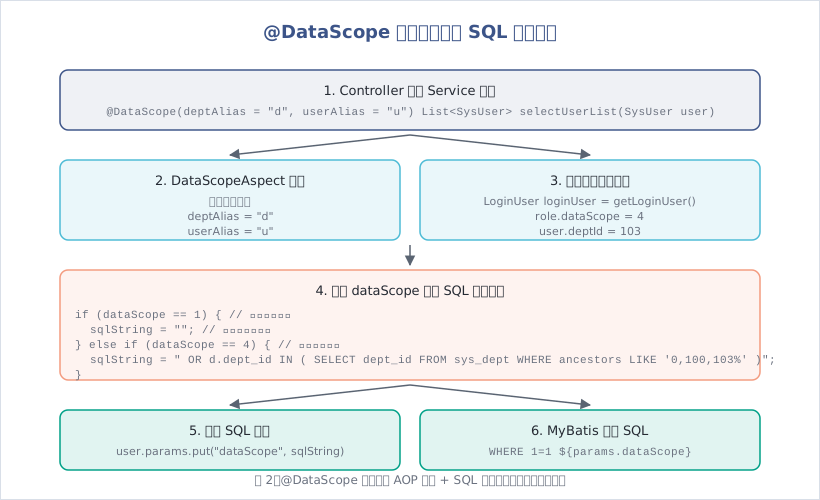
数据权限解决的问题:同一个功能(如”查询用户列表”),不同角色看到的数据范围不同。

  • 超级管理员:看到所有用户
  • 部门经理:看到本部门及下属部门的用户
  • 普通员工:只看到自己创建的用户

图2:@DataScope 注解通过 AOP 拦截 + SQL 动态拼接实现数据权限过滤

2.1 数据权限 5 种范围

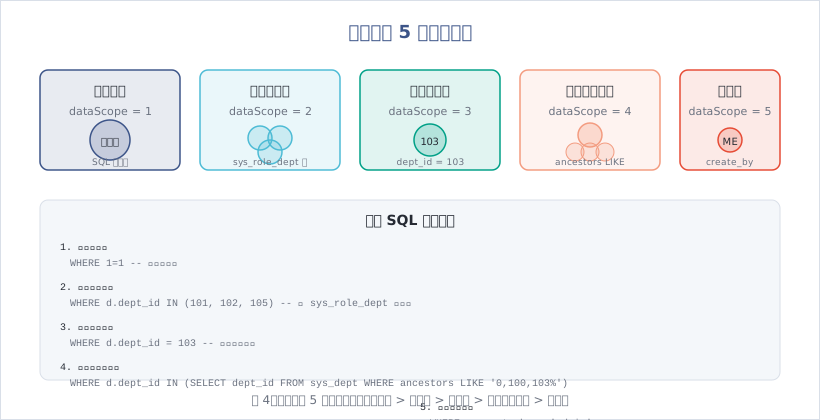
图4:数据权限 5 种范围从宽到严:全部 > 自定义 > 本部门 > 本部门及以下 > 仅本人

sys_role.data_scope 字段定义:

值 名称 说明 SQL 条件示例
1 全部数据权限 不限制,查询所有数据 无额外条件
2 自定义数据权限 指定部门(sys_role_dept 表) dept_id IN (101, 102, 105)
3 本部门数据权限 仅当前用户所在部门 dept_id = 103
4 本部门及以下数据权限 当前部门 + 下属部门 ancestors LIKE '0,100,103%'
5 仅本人数据权限 只看自己创建的数据 create_by = 'admin'

2.2 @DataScope 注解

定义(ruoyi-common 模块):

1
2
3
4
5
6
7
8
9
10
11
12
13
14
15
@Target(ElementType.METHOD)
@Retention(RetentionPolicy.RUNTIME)
@Documented
public @interface DataScope {

/**
* 部门表的别名
*/
String deptAlias() default "";

/**
* 用户表的别名
*/
String userAlias() default "";
}

使用示例:

1
2
3
4
5
6
7
8
9
10
11
12
13
14
15
@Service
public class SysUserServiceImpl implements ISysUserService {

@Autowired
private SysUserMapper userMapper;

/**
* 查询用户列表(带数据权限)
*/
@Override
@DataScope(deptAlias = "d", userAlias = "u")
public List<SysUser> selectUserList(SysUser user) {
return userMapper.selectUserList(user);
}
}

对应的 MyBatis XML(关键是 ${params.dataScope}):

1
2
3
4
5
6
7
8
9
10
11
12
13
14
15
16
17
18
19
20
<select id="selectUserList" parameterType="SysUser" resultMap="SysUserResult">
SELECT u.user_id, u.dept_id, u.user_name, u.nick_name, u.email, u.phonenumber, u.status, u.create_time
FROM sys_user u
LEFT JOIN sys_dept d ON u.dept_id = d.dept_id
WHERE u.del_flag = '0'
<if test="userName != null and userName != ''">
AND u.user_name LIKE concat('%', #{userName}, '%')
</if>
<if test="status != null and status != ''">
AND u.status = #{status}
</if>
<if test="deptId != null and deptId != 0">
AND (u.dept_id = #{deptId} OR u.dept_id IN (
SELECT t.dept_id FROM sys_dept t WHERE find_in_set(#{deptId}, ancestors)
))
</if>
<!-- 数据权限过滤 -->
${params.dataScope}
ORDER BY u.create_time DESC
</select>

一句话记住:${params.dataScope} 是动态注入的 SQL 条件,由 AOP 切面根据用户的角色权限生成。

2.3 DataScopeAspect 切面实现

核心代码(ruoyi-framework 模块):

1
2
3
4
5
6
7
8
9
10
11
12
13
14
15
16
17
18
19
20
21
22
23
24
25
26
27
28
29
30
31
32
33
34
35
36
37
38
39
40
41
42
43
44
45
46
47
48
49
50
51
52
53
54
55
56
57
58
59
60
61
62
63
64
65
66
67
68
69
70
71
72
73
74
75
76
77
78
79
80
81
82
83
84
85
86
87
88
89
90
91
92
93
94
95
96
97
98
99
100
101
102
103
104
105
106
107
108
109
110
111
112
113
114
115
116
117
@Aspect
@Component
public class DataScopeAspect {

/**
* 全部数据权限
*/
public static final String DATA_SCOPE_ALL = "1";

/**
* 自定数据权限
*/
public static final String DATA_SCOPE_CUSTOM = "2";

/**
* 部门数据权限
*/
public static final String DATA_SCOPE_DEPT = "3";

/**
* 部门及以下数据权限
*/
public static final String DATA_SCOPE_DEPT_AND_CHILD = "4";

/**
* 仅本人数据权限
*/
public static final String DATA_SCOPE_SELF = "5";

/**
* 数据权限过滤关键字
*/
public static final String DATA_SCOPE = "dataScope";

@Before("@annotation(controllerDataScope)")
public void doBefore(JoinPoint point, DataScope controllerDataScope) throws Throwable {
clearDataScope(point);
handleDataScope(point, controllerDataScope);
}

protected void handleDataScope(final JoinPoint joinPoint, DataScope controllerDataScope) {
// 获取当前的用户
LoginUser loginUser = SecurityUtils.getLoginUser();
if (loginUser != null) {
SysUser currentUser = loginUser.getUser();

// 如果是超级管理员,则不过滤数据
if (!currentUser.isAdmin()) {
dataScopeFilter(joinPoint, currentUser, controllerDataScope.deptAlias(),
controllerDataScope.userAlias());
}
}
}

/**
* 数据范围过滤
*
* @param joinPoint 切点
* @param user 用户
* @param deptAlias 部门别名
* @param userAlias 用户别名
*/
public static void dataScopeFilter(JoinPoint joinPoint, SysUser user, String deptAlias, String userAlias) {
StringBuilder sqlString = new StringBuilder();
List<SysRole> roles = user.getRoles();

for (SysRole role : roles) {
String dataScope = role.getDataScope();

if (DATA_SCOPE_ALL.equals(dataScope)) {
// 全部数据权限:不拼接任何 SQL
sqlString = new StringBuilder();
break;
} else if (DATA_SCOPE_CUSTOM.equals(dataScope)) {
// 自定义数据权限:查询 sys_role_dept 表
sqlString.append(StringUtils.format(
" OR {}.dept_id IN ( SELECT dept_id FROM sys_role_dept WHERE role_id = ) ",
deptAlias, role.getRoleId()));
} else if (DATA_SCOPE_DEPT.equals(dataScope)) {
// 部门数据权限
sqlString.append(StringUtils.format(" OR {}.dept_id = {} ", deptAlias, user.getDeptId()));
} else if (DATA_SCOPE_DEPT_AND_CHILD.equals(dataScope)) {
// 部门及以下数据权限
sqlString.append(StringUtils.format(
" OR {}.dept_id IN ( SELECT dept_id FROM sys_dept WHERE dept_id = {} OR find_in_set( {} , ancestors ) )",
deptAlias, user.getDeptId(), user.getDeptId()));
} else if (DATA_SCOPE_SELF.equals(dataScope)) {
// 仅本人数据权限
if (StringUtils.isNotBlank(userAlias)) {
sqlString.append(StringUtils.format(" OR {}.user_id = {} ", userAlias, user.getUserId()));
} else {
// 数据权限为仅本人且没有 userAlias 别名时,不查询任何数据
sqlString.append(" OR 1=0 ");
}
}
}

if (StringUtils.isNotBlank(sqlString.toString())) {
Object params = joinPoint.getArgs()[0];
if (params != null && params instanceof BaseEntity) {
BaseEntity baseEntity = (BaseEntity) params;
baseEntity.getParams().put(DATA_SCOPE, " AND (" + sqlString.substring(4) + ")");
}
}
}

/**
* 拼接权限sql前先清空params.dataScope参数防止注入
*/
private void clearDataScope(final JoinPoint joinPoint) {
Object params = joinPoint.getArgs()[0];
if (params != null && params instanceof BaseEntity) {
BaseEntity baseEntity = (BaseEntity) params;
baseEntity.getParams().put(DATA_SCOPE, "");
}
}
}

工作流程:

  1. 拦截:@Before 拦截带 @DataScope 注解的方法
  2. 获取用户:从 SecurityContextHolder 获取当前登录用户
  3. 判断管理员:如果是 admin(userId = 1),不做任何过滤
  4. 遍历角色:用户可能有多个角色,取最宽松的权限(遇到 dataScope = 1 直接跳出)
  5. 生成 SQL:根据 dataScope 值拼接 SQL 条件
  6. 注入参数:将 SQL 字符串存入 params.dataScope,MyBatis 通过 ${params.dataScope} 拼接

生成的 SQL 示例(假设当前用户部门为 103,角色权限为”本部门及以下”):

1
2
3
4
5
6
7
8
SELECT u.user_id, u.user_name, u.dept_id
FROM sys_user u
LEFT JOIN sys_dept d ON u.dept_id = d.dept_id
WHERE u.del_flag = '0'
AND (d.dept_id IN (
SELECT dept_id FROM sys_dept WHERE dept_id = 103 OR find_in_set(103, ancestors)
))
ORDER BY u.create_time DESC;

2.4 数据权限的局限性

⚠️ 注意事项:

  1. 只能过滤列表查询:数据权限只在”查询列表”时生效,对”根据 ID 查询详情”无效(需要业务代码额外判断)
  2. 需要关联部门表:SQL 必须 LEFT JOIN sys_dept,否则 d.dept_id 不存在会报错
  3. 多角色取并集:用户有多个角色时,权限是”或”关系(有一个角色权限宽松就按宽松的来)
  4. 性能问题:find_in_set() 函数和 LIKE 查询性能较差,数据量大时建议使用部门 ID 范围查询

最佳实践:

  • 新增/修改/删除操作前,先调用”查询详情”接口,判断是否有权限操作该数据
  • 敏感操作(如删除)额外加上业务层权限校验:
1
2
3
4
5
6
7
8
9
10
@PreAuthorize("@ss.hasPermi('system:user:remove')")
@Log(title = "用户管理", businessType = BusinessType.DELETE)
@DeleteMapping("/{userIds}")
public AjaxResult remove(@PathVariable Long[] userIds) {
// 额外校验:不能删除自己
if (ArrayUtils.contains(userIds, SecurityUtils.getUserId())) {
return error("当前用户不能删除");
}
return toAjax(userService.deleteUserByIds(userIds));
}

三、菜单树构建与动态路由

3.1 菜单树的递归构建

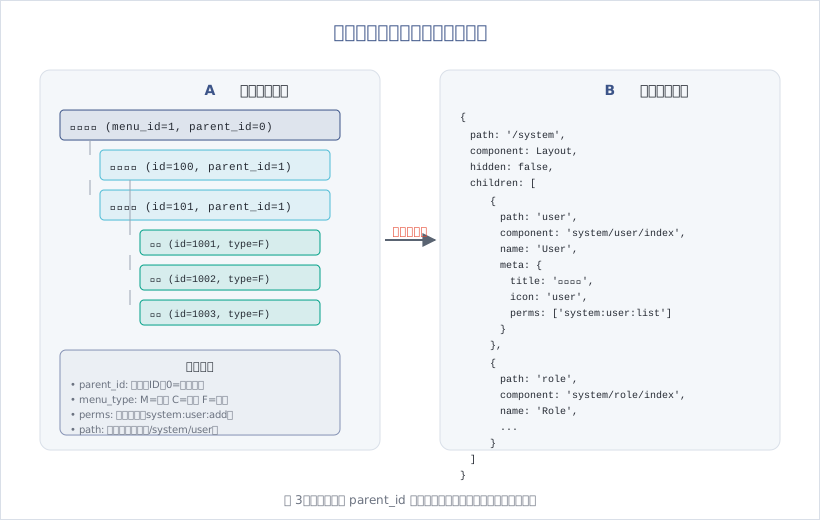
图3:菜单树通过 parent_id 递归构建,前端根据树结构动态生成路由

后端递归构建菜单树:

1
2
3
4
5
6
7
8
9
10
11
12
13
14
15
16
17
18
19
20
21
22
23
24
25
26
27
28
29
30
31
32
33
34
35
36
37
38
39
40
41
42
43
44
45
46
47
48
49
50
51
52
53
54
55
56
57
58
59
60
61
62
@Service
public class SysMenuServiceImpl implements ISysMenuService {

/**
* 构建前端所需要的菜单树
*/
@Override
public List<SysMenu> buildMenuTree(List<SysMenu> menus) {
List<SysMenu> returnList = new ArrayList<>();
List<Long> tempList = menus.stream().map(SysMenu::getMenuId).collect(Collectors.toList());

for (SysMenu menu : menus) {
// 如果是顶级节点,遍历该父节点的所有子节点
if (!tempList.contains(menu.getParentId())) {
recursionFn(menus, menu);
returnList.add(menu);
}
}

if (returnList.isEmpty()) {
returnList = menus;
}
return returnList;
}

/**
* 递归列表
*/
private void recursionFn(List<SysMenu> list, SysMenu t) {
// 得到子节点列表
List<SysMenu> childList = getChildList(list, t);
t.setChildren(childList);

for (SysMenu tChild : childList) {
if (hasChild(list, tChild)) {
recursionFn(list, tChild);
}
}
}

/**
* 得到子节点列表
*/
private List<SysMenu> getChildList(List<SysMenu> list, SysMenu t) {
List<SysMenu> tlist = new ArrayList<>();
Iterator<SysMenu> it = list.iterator();
while (it.hasNext()) {
SysMenu n = it.next();
if (n.getParentId().longValue() == t.getMenuId().longValue()) {
tlist.add(n);
}
}
return tlist;
}

/**
* 判断是否有子节点
*/
private boolean hasChild(List<SysMenu> list, SysMenu t) {
return getChildList(list, t).size() > 0;
}
}

返回的 JSON 结构:

1
2
3
4
5
6
7
8
9
10
11
12
13
14
15
16
17
18
19
20
21
22
23
24
25
26
27
28
29
30
31
32
33
34
35
36
37
38
39
40
41
42
43
44
45
[
{
"menuId": 1,
"menuName": "系统管理",
"parentId": 0,
"menuType": "M",
"path": "system",
"children": [
{
"menuId": 100,
"menuName": "用户管理",
"parentId": 1,
"menuType": "C",
"path": "user",
"component": "system/user/index",
"perms": "system:user:list",
"children": [
{
"menuId": 1001,
"menuName": "用户新增",
"parentId": 100,
"menuType": "F",
"perms": "system:user:add"
},
{
"menuId": 1002,
"menuName": "用户修改",
"parentId": 100,
"menuType": "F",
"perms": "system:user:edit"
}
]
},
{
"menuId": 101,
"menuName": "角色管理",
"parentId": 1,
"menuType": "C",
"path": "role",
"component": "system/role/index",
"perms": "system:role:list"
}
]
}
]

3.2 前端动态路由生成

前端接收菜单树后,转换为 Vue Router 路由:

1
2
3
4
5
6
7
8
9
10
11
12
13
14
15
16
17
18
19
20
21
22
23
24
25
26
27
28
29
30
31
32
33
34
35
36
37
38
39
40
41
42
43
44
45
46
47
48
49
50
51
52
53
54
55
56
57
58
59
60
61
62
63
64
65
66
67
68
69
// ruoyi-ui/src/store/modules/permission.js
import { getRouters } from '@/api/menu'
import Layout from '@/layout/index'

const permission = {
state: {
routes: [],
addRoutes: []
},

mutations: {
SET_ROUTES: (state, routes) => {
state.addRoutes = routes
state.routes = constantRoutes.concat(routes)
}
},

actions: {
// 生成路由
GenerateRoutes({ commit }) {
return new Promise(resolve => {
// 向后端请求路由数据
getRouters().then(res => {
const sdata = JSON.parse(JSON.stringify(res.data))
const rdata = JSON.parse(JSON.stringify(res.data))
const sidebarRoutes = filterAsyncRouter(sdata)
const rewriteRoutes = filterAsyncRouter(rdata, false, true)

commit('SET_ROUTES', rewriteRoutes)
resolve(rewriteRoutes)
})
})
}
}
}

// 遍历后台传来的路由字符串,转换为组件对象
function filterAsyncRouter(asyncRouterMap, lastRouter = false, type = false) {
return asyncRouterMap.filter(route => {
if (type && route.children) {
route.children = filterChildren(route.children)
}

if (route.component) {
// Layout ParentView 组件特殊处理
if (route.component === 'Layout') {
route.component = Layout
} else if (route.component === 'ParentView') {
route.component = ParentView
} else {
route.component = loadView(route.component)
}
}

if (route.children != null && route.children && route.children.length) {
route.children = filterAsyncRouter(route.children, route, type)
} else {
delete route['children']
delete route['redirect']
}

return true
})
}

// 动态导入组件
export const loadView = (view) => {
return (resolve) => require([`@/views/${view}`], resolve)
}

生成的路由配置:

1
2
3
4
5
6
7
8
9
10
11
12
13
14
15
16
17
18
19
20
21
22
23
24
25
26
27
28
29
30
31
[
{
path: '/system',
component: Layout,
hidden: false,
children: [
{
path: 'user',
component: () => import('@/views/system/user/index'),
name: 'User',
meta: {
title: '用户管理',
icon: 'user',
noCache: false,
link: null
}
},
{
path: 'role',
component: () => import('@/views/system/role/index'),
name: 'Role',
meta: {
title: '角色管理',
icon: 'peoples',
noCache: false,
link: null
}
}
]
}
]

挂载到 Vue Router:

1
2
3
4
5
6
7
8
9
10
11
12
13
14
15
16
17
18
19
20
21
22
23
24
25
26
27
// ruoyi-ui/src/permission.js
import router from './router'
import store from './store'

router.beforeEach((to, from, next) => {
if (store.getters.token) {
// 判断当前用户是否已拉取完 user_info 信息
if (store.getters.roles.length === 0) {
store.dispatch('GetInfo').then(() => {
store.dispatch('GenerateRoutes').then(accessRoutes => {
// 根据 roles 权限生成可访问的路由表
router.addRoutes(accessRoutes) // 动态添加可访问路由表
next({ ...to, replace: true }) // hack方法 确保addRoutes已完成
})
}).catch(err => {
store.dispatch('LogOut').then(() => {
Message.error(err)
next({ path: '/' })
})
})
} else {
next()
}
} else {
next()
}
})

一句话记住:后端返回菜单树 JSON → 前端递归解析 → 转换为 Vue Router 配置 → 动态 addRoutes → 侧边栏菜单自动生成。

3.3 按钮权限控制

前端根据菜单树中的 F 类型(按钮) 节点,控制按钮显示:

1
2
3
4
5
6
7
8
9
10
11
12
13
14
15
16
17
18
19
20
21
22
23
24
25
26
27
28
<template>
<el-button
v-hasPermi="['system:user:add']"
type="primary"
icon="Plus"
@click="handleAdd"
>
新增
</el-button>

<el-button
v-hasPermi="['system:user:edit']"
type="success"
icon="Edit"
@click="handleUpdate"
>
修改
</el-button>

<el-button
v-hasPermi="['system:user:remove']"
type="danger"
icon="Delete"
@click="handleDelete"
>
删除
</el-button>
</template>

v-hasPermi 指令会在 DOM 渲染时移除没有权限的按钮(前文已讲解,这里不再赘述)。

结语

这篇文章深入剖析了 RuoYi 的 RBAC 权限模型实现:

  • 四层关系:用户 → 角色(N:M)→ 菜单权限(N:M)+ 用户 → 部门(N:1)
  • 数据权限:@DataScope 注解 → AOP 拦截 → 根据 role.dataScope 生成 SQL 条件 → 注入 params.dataScope → MyBatis 拼接
  • 5 种范围:全部数据(1)、自定义数据(2)、本部门(3)、本部门及以下(4)、仅本人(5)
  • 菜单树:parent_id 递归构建树形结构 → 前端转换为 Vue Router 配置 → 动态挂载路由
  • 按钮权限:菜单表 menu_type = F → 前端 v-hasPermi 指令 → 无权限移除 DOM

下一篇预告:我们将深入 RuoYi 的代码生成器——Velocity 模板引擎原理、代码生成配置、自定义模板开发,一键生成 CRUD 的全流程。

思考与练习

  1. 尝试创建一个新角色”部门经理”,设置数据权限为”本部门及以下”,验证查询用户列表时的 SQL 条件
  2. 阅读 DataScopeAspect 源码,理解为什么用户有多个角色时权限取并集(OR 关系)
  3. 实现一个自定义数据权限:只能看到”最近 30 天创建的数据”
上一页
2026-10-12 09:40:00
下一页