RuoYi 框架从零到一 08 - 文件上传与富文本
2026-10-12 09:40:00

适合人群:已理解 RuoYi 基础架构,需要实现文件上传、图片处理、富文本编辑的同学
本文是《RuoYi 框架从零到一》系列第 08 篇,基于 RuoYi-Vue 4.x 版本。

建议先读 02 - 项目结构与核心模块。

一、文件上传概览

RuoYi 提供了完整的文件上传解决方案,支持 本地存储 和 对象存储(OSS/MinIO)。

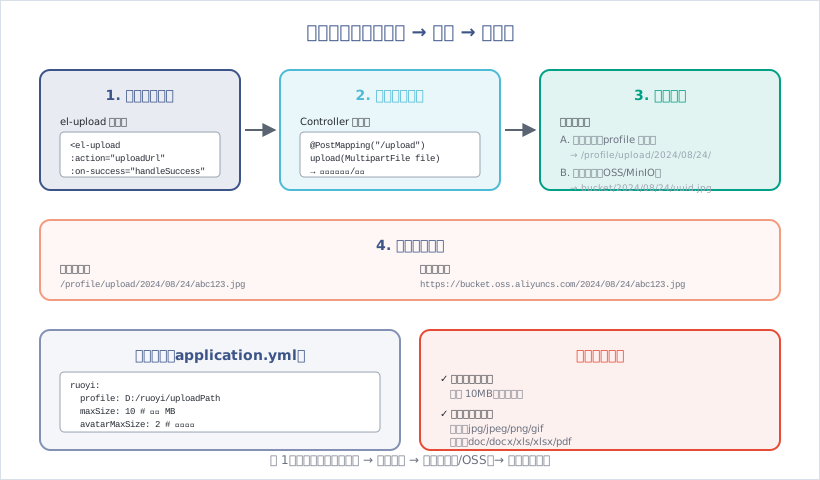
图1:文件上传:前端选择 → 后端校验 → 存储(本地/OSS)→ 返回访问路径

1.1 上传流程

4 个步骤:

  1. 前端选择文件:使用 el-upload 组件
  2. 后端接收文件:MultipartFile 接收,校验文件类型、大小
  3. 文件存储:本地存储(profile 目录)或对象存储(OSS/MinIO)
  4. 返回访问路径:返回文件访问 URL

1.2 存储方式对比

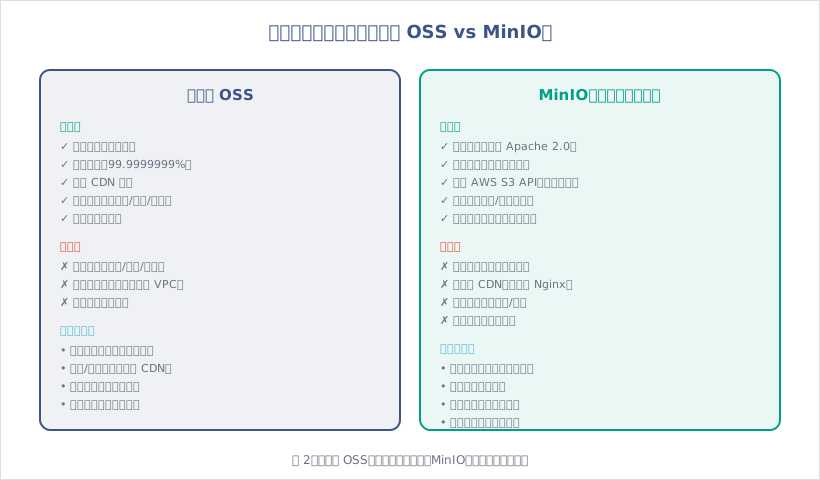
存储方式 优势 劣势 适用场景
本地存储 简单、免费、无依赖 占用服务器磁盘、无法分布式 小文件、内网应用
阿里云 OSS 稳定可靠、全球 CDN、自动备份 按量付费、依赖云厂商 高并发、互联网应用
MinIO 免费开源、私有部署、兼容 S3 需自行运维、无全球 CDN 企业内部、数据敏感

二、本地文件上传

2.1 配置文件

1
2
3
4
5
6
# application.yml
ruoyi:
# 文件上传路径
profile: D:/ruoyi/uploadPath
# 获取地址开关
addressEnabled: true

目录结构:

1
2
3
4
5
6
7
D:/ruoyi/uploadPath/
├── avatar/ # 头像
│ └── 2024/08/24/
│ └── abc123.jpg
└── upload/ # 通用上传
└── 2024/08/24/
└── def456.xlsx

2.2 前端上传组件

(1)单文件上传

1
2
3
4
5
6
7
8
9
10
11
12
13
14
15
16
17
18
19
20
21
22
23
24
25
26
27
28
29
30
31
32
33
34
35
36
37
38
39
40
41
42
43
44
45
46
47
48
49
50
51
52
53
<template>
<el-upload
:action="uploadUrl"
:headers="headers"
:on-success="handleSuccess"
:on-error="handleError"
:before-upload="beforeUpload"
:limit="1"
:file-list="fileList">
<el-button size="small" type="primary">点击上传</el-button>
<div slot="tip" class="el-upload__tip">只能上传 jpg/png 文件,且不超过 2MB</div>
</el-upload>
</template>

<script>
import { getToken } from "@/utils/auth";

export default {
data() {
return {
uploadUrl: process.env.VUE_APP_BASE_API + "/common/upload",
headers: {
Authorization: "Bearer " + getToken()
},
fileList: []
};
},
methods: {
// 上传前校验
beforeUpload(file) {
const isJPG = file.type === 'image/jpeg' || file.type === 'image/png';
const isLt2M = file.size / 1024 / 1024 < 2;

if (!isJPG) {
this.$message.error('只能上传 JPG/PNG 格式的图片!');
}
if (!isLt2M) {
this.$message.error('上传图片大小不能超过 2MB!');
}
return isJPG && isLt2M;
},
// 上传成功
handleSuccess(response, file, fileList) {
this.$message.success("上传成功");
console.log("文件路径:", response.url);
},
// 上传失败
handleError(err, file, fileList) {
this.$message.error("上传失败");
}
}
};
</script>

(2)多文件上传

1
2
3
4
5
6
7
8
9
<el-upload
:action="uploadUrl"
:headers="headers"
:on-success="handleSuccess"
:limit="5"
multiple>
<el-button size="small" type="primary">选择文件</el-button>
<div slot="tip" class="el-upload__tip">一次最多上传 5 个文件</div>
</el-upload>

(3)拖拽上传

1
2
3
4
5
6
7
8
<el-upload
:action="uploadUrl"
:headers="headers"
drag
:on-success="handleSuccess">
<i class="el-icon-upload"></i>
<div class="el-upload__text">将文件拖到此处,或<em>点击上传</em></div>
</el-upload>

2.3 后端接口

(1)通用上传接口

1
2
3
4
5
6
7
8
9
10
11
12
13
14
15
16
17
18
19
20
21
22
23
24
25
26
27
28
29
30
31
32
33
34
35
36
37
38
39
40
41
42
43
44
45
46
47
48
49
50
51
52
53
54
55
56
57
58
59
60
61
62
63
64
// CommonController.java
@RestController
public class CommonController {

@Autowired
private ServerConfig serverConfig;

/**
* 通用上传请求(单文件)
*/
@PostMapping("/common/upload")
public AjaxResult uploadFile(MultipartFile file) throws Exception {
try {
// 上传文件路径
String filePath = RuoYiConfig.getUploadPath();
// 上传并返回新文件名称
String fileName = FileUploadUtils.upload(filePath, file);
// 拼接访问 URL
String url = serverConfig.getUrl() + fileName;

AjaxResult ajax = AjaxResult.success();
ajax.put("url", url);
ajax.put("fileName", fileName);
ajax.put("newFileName", FileUtils.getName(fileName));
ajax.put("originalFilename", file.getOriginalFilename());
return ajax;
} catch (Exception e) {
return AjaxResult.error(e.getMessage());
}
}

/**
* 通用上传请求(多文件)
*/
@PostMapping("/common/uploads")
public AjaxResult uploadFiles(List<MultipartFile> files) throws Exception {
try {
String filePath = RuoYiConfig.getUploadPath();
List<String> urls = new ArrayList<>();
List<String> fileNames = new ArrayList<>();
List<String> newFileNames = new ArrayList<>();
List<String> originalFilenames = new ArrayList<>();

for (MultipartFile file : files) {
String fileName = FileUploadUtils.upload(filePath, file);
String url = serverConfig.getUrl() + fileName;

urls.add(url);
fileNames.add(fileName);
newFileNames.add(FileUtils.getName(fileName));
originalFilenames.add(file.getOriginalFilename());
}

AjaxResult ajax = AjaxResult.success();
ajax.put("urls", StringUtils.join(urls, ","));
ajax.put("fileNames", StringUtils.join(fileNames, ","));
ajax.put("newFileNames", StringUtils.join(newFileNames, ","));
ajax.put("originalFilenames", StringUtils.join(originalFilenames, ","));
return ajax;
} catch (Exception e) {
return AjaxResult.error(e.getMessage());
}
}
}

(2)文件上传工具类

1
2
3
4
5
6
7
8
9
10
11
12
13
14
15
16
17
18
19
20
21
22
23
24
25
26
27
28
29
30
31
32
33
34
35
36
37
38
39
40
41
42
43
44
45
46
47
48
49
50
51
52
53
54
55
56
57
58
59
60
61
62
63
64
65
66
67
68
69
70
71
72
73
74
75
76
77
78
79
80
81
82
83
84
85
86
87
88
89
90
91
92
93
94
95
96
97
98
99
100
101
102
103
104
105
106
107
108
109
// FileUploadUtils.java
public class FileUploadUtils {

/**
* 默认大小 50M
*/
public static final long DEFAULT_MAX_SIZE = 50 * 1024 * 1024;

/**
* 默认上传的地址
*/
private static String defaultBaseDir = RuoYiConfig.getProfile();

/**
* 根据文件路径上传
*/
public static final String upload(String baseDir, MultipartFile file) throws IOException {
try {
return upload(baseDir, file, MimeTypeUtils.DEFAULT_ALLOWED_EXTENSION);
} catch (Exception e) {
throw new IOException(e.getMessage(), e);
}
}

/**
* 文件上传
*/
public static final String upload(String baseDir, MultipartFile file, String[] allowedExtension)
throws FileSizeLimitExceededException, IOException, FileNameLengthLimitExceededException,
InvalidExtensionException {
int fileNamelength = file.getOriginalFilename().length();
if (fileNamelength > FileUploadUtils.DEFAULT_FILE_NAME_LENGTH) {
throw new FileNameLengthLimitExceededException(FileUploadUtils.DEFAULT_FILE_NAME_LENGTH);
}

assertAllowed(file, allowedExtension);

String fileName = extractFilename(file);

File desc = getAbsoluteFile(baseDir, fileName);
file.transferTo(desc);
String pathFileName = getPathFileName(baseDir, fileName);
return pathFileName;
}

/**
* 编码文件名
*/
public static final String extractFilename(MultipartFile file) {
String fileName = file.getOriginalFilename();
String extension = getExtension(file);
fileName = DateUtils.datePath() + "/" + IdUtils.fastUUID() + "." + extension;
return fileName;
}

/**
* 文件大小校验
*/
public static final void assertAllowed(MultipartFile file, String[] allowedExtension)
throws FileSizeLimitExceededException, InvalidExtensionException {
long size = file.getSize();
if (size > DEFAULT_MAX_SIZE) {
throw new FileSizeLimitExceededException(DEFAULT_MAX_SIZE / 1024 / 1024);
}

String fileName = file.getOriginalFilename();
String extension = getExtension(file);
if (allowedExtension != null && !isAllowedExtension(extension, allowedExtension)) {
if (allowedExtension == MimeTypeUtils.IMAGE_EXTENSION) {
throw new InvalidExtensionException.InvalidImageExtensionException(allowedExtension, extension,
fileName);
} else if (allowedExtension == MimeTypeUtils.FLASH_EXTENSION) {
throw new InvalidExtensionException.InvalidFlashExtensionException(allowedExtension, extension,
fileName);
} else if (allowedExtension == MimeTypeUtils.MEDIA_EXTENSION) {
throw new InvalidExtensionException.InvalidMediaExtensionException(allowedExtension, extension,
fileName);
} else if (allowedExtension == MimeTypeUtils.VIDEO_EXTENSION) {
throw new InvalidExtensionException.InvalidVideoExtensionException(allowedExtension, extension,
fileName);
} else {
throw new InvalidExtensionException(allowedExtension, extension, fileName);
}
}
}

/**
* 判断MIME类型是否是允许的MIME类型
*/
public static final boolean isAllowedExtension(String extension, String[] allowedExtension) {
for (String str : allowedExtension) {
if (str.equalsIgnoreCase(extension)) {
return true;
}
}
return false;
}

/**
* 获取文件名的后缀
*/
public static final String getExtension(MultipartFile file) {
String extension = FilenameUtils.getExtension(file.getOriginalFilename());
if (StringUtils.isEmpty(extension)) {
extension = MimeTypeUtils.getExtension(file.getContentType());
}
return extension;
}
}

2.4 文件下载

1
2
3
4
5
6
7
8
9
10
11
12
13
14
15
16
17
18
19
20
21
22
23
24
// CommonController.java
/**
* 本地资源通用下载
*/
@GetMapping("/common/download/resource")
public void resourceDownload(String resource, HttpServletRequest request, HttpServletResponse response)
throws Exception {
try {
if (!FileUtils.checkAllowDownload(resource)) {
throw new Exception(StringUtils.format("资源文件({})非法,不允许下载。 ", resource));
}
// 本地资源路径
String localPath = RuoYiConfig.getProfile();
// 数据库资源地址
String downloadPath = localPath + StringUtils.substringAfter(resource, Constants.RESOURCE_PREFIX);
// 下载名称
String downloadName = StringUtils.substringAfterLast(downloadPath, "/");
response.setContentType(MediaType.APPLICATION_OCTET_STREAM_VALUE);
FileUtils.setAttachmentResponseHeader(response, downloadName);
FileUtils.writeBytes(downloadPath, response.getOutputStream());
} catch (Exception e) {
log.error("下载文件失败", e);
}
}

三、对象存储(OSS/MinIO)

3.1 阿里云 OSS vs MinIO

图2:阿里云 OSS:稳定便捷但付费;MinIO:免费可控但需运维

3.2 集成阿里云 OSS

(1)添加依赖

1
2
3
4
5
<dependency>
<groupId>com.aliyun.oss</groupId>
<artifactId>aliyun-sdk-oss</artifactId>
<version>3.15.1</version>
</dependency>

(2)配置文件

1
2
3
4
5
6
7
8
9
# application.yml
aliyun:
oss:
endpoint: oss-cn-hangzhou.aliyuncs.com
accessKeyId: YOUR_ACCESS_KEY_ID
accessKeySecret: YOUR_ACCESS_KEY_SECRET
bucketName: ruoyi-bucket
# 自定义域名(可选)
domain: https://cdn.yourdomain.com

(3)OSS 工具类

1
2
3
4
5
6
7
8
9
10
11
12
13
14
15
16
17
18
19
20
21
22
23
24
25
26
27
28
29
30
31
32
33
34
35
36
37
38
39
40
41
42
43
44
45
46
47
48
49
50
51
52
53
54
55
56
57
// OSSUtils.java
@Component
public class OSSUtils {

@Value("${aliyun.oss.endpoint}")
private String endpoint;

@Value("${aliyun.oss.accessKeyId}")
private String accessKeyId;

@Value("${aliyun.oss.accessKeySecret}")
private String accessKeySecret;

@Value("${aliyun.oss.bucketName}")
private String bucketName;

@Value("${aliyun.oss.domain:}")
private String domain;

/**
* 上传文件
*/
public String upload(MultipartFile file) throws IOException {
// 创建 OSSClient 实例
OSS ossClient = new OSSClientBuilder().build(endpoint, accessKeyId, accessKeySecret);

try {
// 生成文件名:2024/08/24/uuid.jpg
String fileName = DateUtils.datePath() + "/" + IdUtils.fastUUID() + "." +
FileUploadUtils.getExtension(file);

// 上传文件
ossClient.putObject(bucketName, fileName, file.getInputStream());

// 返回访问 URL
if (StringUtils.isNotEmpty(domain)) {
return domain + "/" + fileName;
} else {
return "https://" + bucketName + "." + endpoint + "/" + fileName;
}
} finally {
ossClient.shutdown();
}
}

/**
* 删除文件
*/
public void delete(String fileName) {
OSS ossClient = new OSSClientBuilder().build(endpoint, accessKeyId, accessKeySecret);
try {
ossClient.deleteObject(bucketName, fileName);
} finally {
ossClient.shutdown();
}
}
}

(4)Controller 调用

1
2
3
4
5
6
7
8
9
10
11
12
13
14
15
16
17
18
19
// CommonController.java
@Autowired
private OSSUtils ossUtils;

/**
* OSS 上传
*/
@PostMapping("/common/oss/upload")
public AjaxResult ossUpload(MultipartFile file) {
try {
String url = ossUtils.upload(file);
AjaxResult ajax = AjaxResult.success();
ajax.put("url", url);
ajax.put("fileName", file.getOriginalFilename());
return ajax;
} catch (Exception e) {
return AjaxResult.error(e.getMessage());
}
}

3.3 集成 MinIO

(1)Docker 部署 MinIO

1
2
3
4
5
6
7
8
docker run -d \
--name minio \
-p 9000:9000 \
-p 9001:9001 \
-e "MINIO_ROOT_USER=admin" \
-e "MINIO_ROOT_PASSWORD=admin123456" \
-v /data/minio/data:/data \
minio/minio server /data --console-address ":9001"

访问控制台:http://localhost:9001(admin / admin123456)

(2)添加依赖

1
2
3
4
5
<dependency>
<groupId>io.minio</groupId>
<artifactId>minio</artifactId>
<version>8.5.2</version>
</dependency>

(3)配置文件

1
2
3
4
5
6
# application.yml
minio:
endpoint: http://localhost:9000
accessKey: admin
secretKey: admin123456
bucketName: ruoyi

(4)MinIO 工具类

1
2
3
4
5
6
7
8
9
10
11
12
13
14
15
16
17
18
19
20
21
22
23
24
25
26
27
28
29
30
31
32
33
34
35
36
37
38
39
40
41
42
43
44
45
46
47
48
49
50
51
52
53
54
55
56
57
58
59
60
61
62
63
64
65
66
67
68
69
70
71
72
73
74
// MinioUtils.java
@Component
public class MinioUtils {

@Value("${minio.endpoint}")
private String endpoint;

@Value("${minio.accessKey}")
private String accessKey;

@Value("${minio.secretKey}")
private String secretKey;

@Value("${minio.bucketName}")
private String bucketName;

/**
* 初始化 MinioClient
*/
private MinioClient getMinioClient() {
return MinioClient.builder()
.endpoint(endpoint)
.credentials(accessKey, secretKey)
.build();
}

/**
* 创建 bucket
*/
public void createBucket() throws Exception {
MinioClient minioClient = getMinioClient();
boolean exists = minioClient.bucketExists(BucketExistsArgs.builder().bucket(bucketName).build());
if (!exists) {
minioClient.makeBucket(MakeBucketArgs.builder().bucket(bucketName).build());
}
}

/**
* 上传文件
*/
public String upload(MultipartFile file) throws Exception {
MinioClient minioClient = getMinioClient();

// 生成文件名
String fileName = DateUtils.datePath() + "/" + IdUtils.fastUUID() + "." +
FileUploadUtils.getExtension(file);

// 上传文件
minioClient.putObject(
PutObjectArgs.builder()
.bucket(bucketName)
.object(fileName)
.stream(file.getInputStream(), file.getSize(), -1)
.contentType(file.getContentType())
.build()
);

// 返回访问 URL
return endpoint + "/" + bucketName + "/" + fileName;
}

/**
* 删除文件
*/
public void delete(String fileName) throws Exception {
MinioClient minioClient = getMinioClient();
minioClient.removeObject(
RemoveObjectArgs.builder()
.bucket(bucketName)
.object(fileName)
.build()
);
}
}

四、富文本编辑器

4.1 富文本编辑器对比

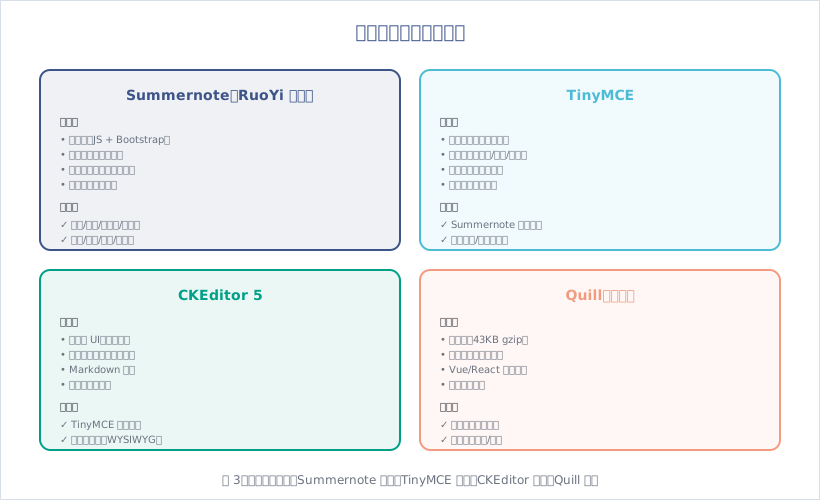
图3:富文本编辑器:Summernote 轻量、TinyMCE 强大、CKEditor 现代、Quill 灵活

4.2 Summernote(RuoYi 默认)

(1)引入资源

1
2
3
4
5
<!-- index.html -->
<link href="/ajax/libs/summernote/summernote.css" rel="stylesheet">
<link href="/ajax/libs/summernote/summernote-bs4.css" rel="stylesheet">
<script src="/ajax/libs/summernote/summernote.min.js"></script>
<script src="/ajax/libs/summernote/summernote-zh-CN.min.js"></script>

(2)Vue 组件

1
2
3
4
5
6
7
8
9
10
11
12
13
14
15
16
17
18
19
20
21
22
23
24
25
26
27
28
29
30
31
32
33
34
35
36
37
38
39
40
41
42
43
44
45
46
47
48
49
50
51
52
53
54
55
56
57
58
59
60
61
62
63
64
65
66
67
68
69
70
71
72
73
74
75
76
77
78
79
80
81
82
83
84
85
<template>
<div>
<div ref="editor"></div>
</div>
</template>

<script>
export default {
name: "Editor",
props: {
value: {
type: String
},
height: {
type: Number,
default: 200
}
},
data() {
return {
editor: null
};
},
mounted() {
this.initEditor();
},
methods: {
initEditor() {
const _this = this;
$(this.$refs.editor).summernote({
lang: 'zh-CN',
height: this.height,
minHeight: null,
maxHeight: null,
focus: false,
callbacks: {
// 内容改变时
onChange: function(contents) {
_this.$emit('input', contents);
},
// 图片上传
onImageUpload: function(files) {
_this.uploadImage(files[0]);
}
},
toolbar: [
['style', ['style']],
['font', ['bold', 'underline', 'clear']],
['fontname', ['fontname']],
['color', ['color']],
['para', ['ul', 'ol', 'paragraph']],
['table', ['table']],
['insert', ['link', 'picture', 'video']],
['view', ['fullscreen', 'codeview', 'help']]
]
});

// 设置初始值
$(this.$refs.editor).summernote('code', this.value || '');
},
// 上传图片
uploadImage(file) {
const formData = new FormData();
formData.append('file', file);

this.$axios.post('/common/upload', formData).then(res => {
if (res.code === 200) {
$(this.$refs.editor).summernote('insertImage', res.url);
}
});
},
// 获取内容
getContent() {
return $(this.$refs.editor).summernote('code');
},
// 设置内容
setContent(content) {
$(this.$refs.editor).summernote('code', content);
}
},
beforeDestroy() {
$(this.$refs.editor).summernote('destroy');
}
};
</script>

(3)使用示例

1
2
3
4
5
6
7
8
9
10
11
12
13
14
15
16
17
18
19
20
21
22
23
24
25
<template>
<div>
<editor v-model="content" :height="300"></editor>
<el-button @click="submit">提交</el-button>
</div>
</template>

<script>
import Editor from '@/components/Editor';

export default {
components: { Editor },
data() {
return {
content: ''
};
},
methods: {
submit() {
console.log(this.content);
// 提交到后端
}
}
};
</script>

4.3 集成 Quill(推荐)

(1)安装依赖

1
2
npm install quill@1.3.7
npm install vue-quill-editor@3.0.6

(2)Vue 组件

1
2
3
4
5
6
7
8
9
10
11
12
13
14
15
16
17
18
19
20
21
22
23
24
25
26
27
28
29
30
31
32
33
34
35
36
37
38
39
40
41
42
43
44
45
46
47
48
49
50
51
52
53
54
55
56
57
58
59
60
61
62
63
64
65
66
67
68
69
70
71
72
73
74
75
76
77
78
79
80
81
82
83
84
85
86
87
88
89
90
91
92
93
94
95
96
97
98
99
100
101
102
103
104
105
106
107
108
109
110
111
112
<template>
<div class="editor">
<quill-editor
ref="myQuillEditor"
v-model="content"
:options="editorOption"
@blur="onEditorBlur"
@focus="onEditorFocus"
@change="onEditorChange">
</quill-editor>
</div>
</template>

<script>
import { quillEditor } from 'vue-quill-editor';
import 'quill/dist/quill.core.css';
import 'quill/dist/quill.snow.css';
import 'quill/dist/quill.bubble.css';

export default {
components: { quillEditor },
props: {
value: {
type: String,
default: ''
},
height: {
type: Number,
default: 300
}
},
data() {
return {
content: this.value,
editorOption: {
theme: 'snow',
modules: {
toolbar: {
container: [
['bold', 'italic', 'underline', 'strike'],
['blockquote', 'code-block'],
[{ 'header': 1 }, { 'header': 2 }],
[{ 'list': 'ordered' }, { 'list': 'bullet' }],
[{ 'script': 'sub' }, { 'script': 'super' }],
[{ 'indent': '-1' }, { 'indent': '+1' }],
[{ 'direction': 'rtl' }],
[{ 'size': ['small', false, 'large', 'huge'] }],
[{ 'header': [1, 2, 3, 4, 5, 6, false] }],
[{ 'color': [] }, { 'background': [] }],
[{ 'font': [] }],
[{ 'align': [] }],
['link', 'image', 'video'],
['clean']
],
handlers: {
image: this.handleImageUpload
}
}
},
placeholder: '请输入内容...'
}
};
},
watch: {
value(newVal) {
this.content = newVal;
},
content(newVal) {
this.$emit('input', newVal);
}
},
methods: {
onEditorBlur(quill) {
console.log('editor blur!', quill);
},
onEditorFocus(quill) {
console.log('editor focus!', quill);
},
onEditorChange({ quill, html, text }) {
this.content = html;
},
// 自定义图片上传
handleImageUpload() {
const input = document.createElement('input');
input.setAttribute('type', 'file');
input.setAttribute('accept', 'image/*');
input.click();

input.onchange = () => {
const file = input.files[0];
const formData = new FormData();
formData.append('file', file);

this.$axios.post('/common/upload', formData).then(res => {
if (res.code === 200) {
const quill = this.$refs.myQuillEditor.quill;
const length = quill.getSelection().index;
quill.insertEmbed(length, 'image', res.url);
quill.setSelection(length + 1);
}
});
};
}
}
};
</script>

<style scoped>
.editor ::v-deep .ql-editor {
min-height: 300px;
}
</style>

五、图片处理(压缩 + 水印 + 缩略图)

5.1 图片处理流程

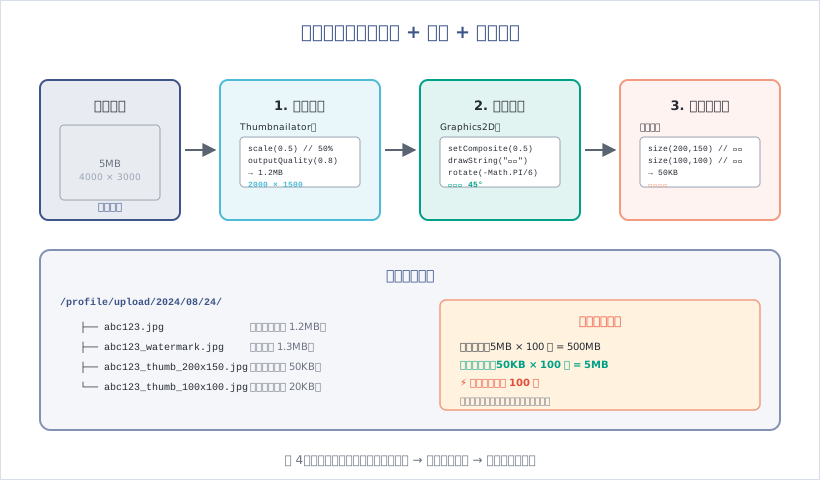
图4:图片处理三步骤:压缩减少体积 → 水印保护版权 → 缩略图加速加载

5.2 集成 Thumbnailator

(1)添加依赖

1
2
3
4
5
<dependency>
<groupId>net.coobird</groupId>
<artifactId>thumbnailator</artifactId>
<version>0.4.19</version>
</dependency>

(2)图片压缩

1
2
3
4
5
6
7
8
9
10
11
12
13
14
15
16
17
18
19
20
21
22
23
24
25
26
27
28
29
30
31
32
33
34
35
36
37
38
39
40
41
42
43
44
45
46
// ImageUtils.java
public class ImageUtils {

/**
* 图片压缩(按比例)
*/
public static void compress(String srcPath, String destPath, double scale) throws IOException {
Thumbnails.of(srcPath)
.scale(scale) // 缩放比例(0.5 = 50%)
.outputQuality(0.8) // 输出质量(0.8 = 80%)
.toFile(destPath);
}

/**
* 图片压缩(按尺寸)
*/
public static void compressToSize(String srcPath, String destPath, int width, int height) throws IOException {
Thumbnails.of(srcPath)
.size(width, height) // 指定宽高
.keepAspectRatio(true) // 保持宽高比
.outputQuality(0.8)
.toFile(destPath);
}

/**
* 图片压缩(限制文件大小)
*/
public static void compressToFileSize(String srcPath, String destPath, long maxSize) throws IOException {
// maxSize 单位:字节(如 1MB = 1024 * 1024)
double quality = 0.9;

while (true) {
Thumbnails.of(srcPath)
.scale(1.0)
.outputQuality(quality)
.toFile(destPath);

File file = new File(destPath);
if (file.length() <= maxSize || quality <= 0.1) {
break;
}

quality -= 0.1; // 逐步降低质量
}
}
}

5.3 添加水印

1
2
3
4
5
6
7
8
9
10
11
12
13
14
15
16
17
18
19
20
21
22
23
24
25
26
27
28
29
30
31
32
33
34
35
36
37
38
39
40
41
42
43
44
45
46
/**
* 添加文字水印
*/
public static void addTextWatermark(String srcPath, String destPath, String text) throws IOException {
BufferedImage image = ImageIO.read(new File(srcPath));
Graphics2D g = image.createGraphics();

// 设置水印透明度
g.setComposite(AlphaComposite.getInstance(AlphaComposite.SRC_ATOP, 0.5f));

// 设置字体
g.setFont(new Font("微软雅黑", Font.BOLD, 50));
g.setColor(Color.WHITE);

// 计算水印位置(右下角)
FontMetrics fm = g.getFontMetrics();
int textWidth = fm.stringWidth(text);
int textHeight = fm.getHeight();
int x = image.getWidth() - textWidth - 20;
int y = image.getHeight() - textHeight;

// 旋转 45 度
g.rotate(-Math.PI / 6, x, y);

// 绘制水印
g.drawString(text, x, y);
g.dispose();

// 保存图片
ImageIO.write(image, "jpg", new File(destPath));
}

/**
* 添加图片水印
*/
public static void addImageWatermark(String srcPath, String watermarkPath, String destPath) throws IOException {
Thumbnails.of(srcPath)
.scale(1.0)
.watermark(
Positions.BOTTOM_RIGHT, // 右下角
ImageIO.read(new File(watermarkPath)),
0.5f // 透明度
)
.outputQuality(0.8)
.toFile(destPath);
}

5.4 生成缩略图

1
2
3
4
5
6
7
8
9
10
11
12
13
14
15
16
17
18
19
20
21
22
23
24
25
26
27
/**
* 生成缩略图
*/
public static void createThumbnail(String srcPath, String destPath, int width, int height) throws IOException {
Thumbnails.of(srcPath)
.size(width, height)
.keepAspectRatio(true) // 保持宽高比
.toFile(destPath);
}

/**
* 生成多个尺寸的缩略图
*/
public static void createMultipleThumbnails(String srcPath, String destDir) throws IOException {
File srcFile = new File(srcPath);
String fileName = srcFile.getName();
String baseName = fileName.substring(0, fileName.lastIndexOf("."));
String extension = fileName.substring(fileName.lastIndexOf("."));

// 200x150(列表页)
String thumb200 = destDir + "/" + baseName + "_thumb_200x150" + extension;
createThumbnail(srcPath, thumb200, 200, 150);

// 100x100(头像)
String thumb100 = destDir + "/" + baseName + "_thumb_100x100" + extension;
createThumbnail(srcPath, thumb100, 100, 100);
}

5.5 完整示例

1
2
3
4
5
6
7
8
9
10
11
12
13
14
15
16
17
18
19
20
21
22
23
24
25
26
27
28
29
30
31
32
33
34
35
36
37
// CommonController.java
/**
* 上传图片(自动压缩 + 水印 + 缩略图)
*/
@PostMapping("/common/upload/image")
public AjaxResult uploadImage(MultipartFile file) {
try {
// 1. 上传原图
String filePath = RuoYiConfig.getUploadPath();
String fileName = FileUploadUtils.upload(filePath, file);
String fullPath = RuoYiConfig.getProfile() + fileName;

// 2. 压缩图片(50%)
String compressPath = fullPath.replace(".jpg", "_compress.jpg");
ImageUtils.compress(fullPath, compressPath, 0.5);

// 3. 添加水印
String watermarkPath = fullPath.replace(".jpg", "_watermark.jpg");
ImageUtils.addTextWatermark(compressPath, watermarkPath, "若依框架");

// 4. 生成缩略图
String thumbDir = new File(fullPath).getParent();
ImageUtils.createMultipleThumbnails(compressPath, thumbDir);

// 5. 返回 URL
String url = serverConfig.getUrl() + fileName;
AjaxResult ajax = AjaxResult.success();
ajax.put("url", url);
ajax.put("compressUrl", url.replace(".jpg", "_compress.jpg"));
ajax.put("watermarkUrl", url.replace(".jpg", "_watermark.jpg"));
ajax.put("thumb200Url", url.replace(".jpg", "_thumb_200x150.jpg"));
ajax.put("thumb100Url", url.replace(".jpg", "_thumb_100x100.jpg"));
return ajax;
} catch (Exception e) {
return AjaxResult.error(e.getMessage());
}
}

六、最佳实践

6.1 文件上传安全

  1. 文件类型校验:白名单限制(如只允许 jpg/png/pdf)
  2. 文件大小限制:防止大文件攻击
  3. 文件名重命名:使用 UUID,防止路径遍历攻击
  4. 病毒扫描:集成 ClamAV 扫描上传文件
  5. 访问权限:敏感文件需要登录后才能访问

6.2 性能优化

  1. 图片压缩:减少 80% 体积,加速加载
  2. 缩略图:列表页使用小图,详情页加载原图
  3. CDN 加速:静态资源使用 CDN 分发
  4. 懒加载:图片滚动到视口才加载
  5. WebP 格式:比 JPEG 小 30%(需浏览器支持)

6.3 存储成本优化

  1. 定期清理:删除未使用的文件(如临时上传)
  2. 冷热分离:旧文件迁移到低成本存储(如 OSS 归档)
  3. 压缩存储:原图压缩后再存储
  4. 去重:相同文件只存储一份(Hash 去重)

七、常见问题

7.1 上传失败:文件大小超出限制?

原因:Spring Boot 默认限制 1MB。

解决方案:

1
2
3
4
5
6
# application.yml
spring:
servlet:
multipart:
max-file-size: 100MB # 单文件最大 100MB
max-request-size: 100MB # 请求最大 100MB

Nginx 也需配置:

1
2
# nginx.conf
client_max_body_size 100m;

7.2 跨域问题:OSS 图片无法访问?

原因:OSS 跨域未配置。

解决方案:

  1. 登录阿里云 OSS 控制台
  2. 找到 Bucket → 权限管理 → 跨域设置
  3. 添加规则:
    • 来源:*
    • 允许 Methods:GET, POST, PUT, DELETE, HEAD
    • 允许 Headers:*
    • 暴露 Headers:ETag

7.3 图片上传后无法显示?

原因:

  1. 文件路径错误(Windows 使用 \,需转换为 /)
  2. Nginx 静态资源未配置
  3. OSS Bucket 权限为私有

排查:

1
2
3
4
5
6
7
# 检查文件是否存在
ls /profile/upload/2024/08/24/abc123.jpg

# 检查 Nginx 配置
nginx -t

# 检查 OSS 权限(改为公共读)

7.4 富文本编辑器图片上传失败?

原因:

  1. 上传接口未配置
  2. Token 未传递
  3. 跨域问题

解决方案:

1
2
3
4
5
6
7
8
9
10
11
12
13
14
15
16
17
18
19
20
21
// 配置上传接口
onImageUpload: function(files) {
const formData = new FormData();
formData.append('file', files[0]);

$.ajax({
url: '/common/upload',
type: 'POST',
data: formData,
headers: {
'Authorization': 'Bearer ' + getToken() // 添加 Token
},
processData: false,
contentType: false,
success: function(res) {
if (res.code === 200) {
$('#summernote').summernote('insertImage', res.url);
}
}
});
}

结语

这篇文章深入解析了 RuoYi 的文件上传与富文本功能:

  • 本地文件上传:el-upload 组件 + MultipartFile 接收 + profile 目录存储
  • 对象存储:阿里云 OSS(稳定便捷但付费)vs MinIO(免费可控但需运维)
  • 富文本编辑器:Summernote(轻量)、TinyMCE(强大)、CKEditor(现代)、Quill(灵活推荐)
  • 图片处理:Thumbnailator 压缩(减少 80% 体积)+ 水印(保护版权)+ 缩略图(加速加载)

至此,RuoYi 框架从零到一系列第三部分”功能模块”(05-08 共 4 篇)已全部完成!

思考与练习

  1. 实现一个头像上传功能:限制 2MB、只允许 jpg/png、自动裁剪为正方形、生成 3 个尺寸缩略图
  2. 集成 MinIO 对象存储,替换本地存储,并实现文件的上传、下载、删除
  3. 使用 Quill 富文本编辑器,实现图片拖拽上传、自动压缩、自动添加水印

下一篇预告:我们将进入第四部分”进阶扩展”——MyBatis 增强与分页、接口文档与参数校验、缓存与性能优化。

上一页
2026-10-12 09:40:00
下一页